
Visamundi introduces its WebMCP: when websites talk to AI agents
The web was designed for humans who read and click. AI agents, on the other hand, have to guess what a page can do. WebMCP changes that: a website declares its own actions, and the browser's agent calls them directly, without mimicking human behavior. Here's what it is, how it works, and why visamundi has already implemented it in its visa application form.
Today's AI agents navigate websites blindly. An AI agent tasked with acting on a site (booking, filling out a form, comparing offers) has only two options. It reads the page's HTML markup, or it takes screenshots and clicks where it guesses buttons are located.
Both approaches share the same flaws:
Fragile: moving a button, changing a label, or a cookie consent modal is enough to break the entire workflow.
Slow and expensive: each step requires the agent to parse an entire page or image, just to perform a single action.
Imprecise: agents guess the meaning of fields. On an India visa form, confusing "date of issue" with "date of expiry" has real consequences.
Opaque to the website: the editor doesn't know an agent is at work and cannot guide or frame its interaction.
Today's AI agents navigate websites blindly. They have to work with incomplete or easily broken cues. The problem isn't their intelligence; it's that the site never tells them what it can do.
WebMCP in a Nutshell
WebMCP (Model Context Protocol for the Web) is a browser API that enables a webpage to declare tools: named actions, described in natural language, with typed parameters. The AI agent embedded in the browser discovers and invokes them like functions.
The name comes from MCP (Model Context Protocol), the open standard launched by Anthropic in late 2024 to connect AI models to tools and data. MCP has been adopted by most market assistants (Claude, ChatGPT, Cursor, Copilot, etc.). WebMCP borrows these concepts (tool, description, input schema) but embeds them directly into the webpage, inside the browser.
The proposal is driven by engineers from Google and Microsoft and incubated within the Web Machine Learning Community Group at W3C. Chrome released a first experimental implementation in version 146, behind a test flag. It's not a standard yet: the API evolves with each release.
The core idea: the site provides its tools directly to the AI agent, with the session, context, and interface already open in the user's browser tab.
How It Works
WebMCP offers two ways to declare tools: a JavaScript API for rich interactions, and HTML attributes to turn an existing form into a tool.
A Typical Workflow
The user opens the site and asks their browser's AI assistant: «prepare my India visa application».
An Model Context Protocol aware agent within the browser lists the tools declared by the page and reads their descriptions.
It invokes relevant tools with structured parameters.
The page executes the action and returns a model-readable result.
For sensitive actions (create, pay, submit), the browser may ask the user for confirmation.
Note: the API names (navigator.modelContext vs. document.modelContext, registerTool vs. provideContext) vary by spec version. The examples above illustrate the spirit, not a final signature.
MCP and WebMCP: Two Gates to the Same Services
WebMCP’s role is complementary rather than a replacement of a remote MCP server. WebMCP focuses on assisting users within their active browser tab; the classic MCP server serves agents working autonomously outside the browser.
WebMCP vs classic MCP | ||
|---|---|---|
Tool execution location | Remote server | Within the open webpage |
Target users | Claude, ChatGPT, Cursor, autonomous agents | AI agent embedded in the browser |
Setup | User adds server URL | No setup needed: just open the site |
Authentication | API key or OAuth | Handled via browser session |
Human in the loop | Depends on client | Native: user sees webpage and can confirm |
Maturity | Mature standard (widely adopted) | Experimental (Chrome 146+, behind a flag) |
For a publisher, the optimal strategy is to define tools once and expose them through both channels.
Visamundi’s Approach: Deploying WebMCPs Inside Its Visa Application Form
Currently, visamundi exposes its tools via both methods: our public MCP server (mcp.visamundi.io) and our WebMCP-powered visa application form at form.visamundi.app. While the original goal was to prepare visa applications via remote MCP servers, our form now acts as a bridge delivering the same data.
The principles are the same: a single definition of each tool, served through two distribution channels.
Upon loading, if the browser hosts an MCP-aware agent, the webpage connects to the public MCP server and fetches the tool list.
Webpage MCP implementation then declares all tools to the browser agent, complete with names, descriptions, and schemas.
When invoked by the agent, the webpage relays the request to the server and returns the response in the same format.
In any browser without WebMCP support, nothing changes: the form keeps working normally for human users.
Tool | Type | Function |
|---|---|---|
list_visas | read | Lists visas available for a given destination |
get_visa | read | Provides details for a specific visa |
get_visa_requirements | read | Checks whether a visa is required for a nationality and destination |
get_application_form | read | Returns form fields, questionnaire and estimated costs for an application |
save_application | write | Creates or updates a traveler’s application |
get_payment_link | write | Provides payment link, estimated delivery date and processing instructions |
AI agents can prepare complete applications—travel, travelers, and billing—but cannot pay, accept terms and conditions, or submit consents. Users finalize sensitive actions themselves on the summary page, opened via the payment link provided by the agent.
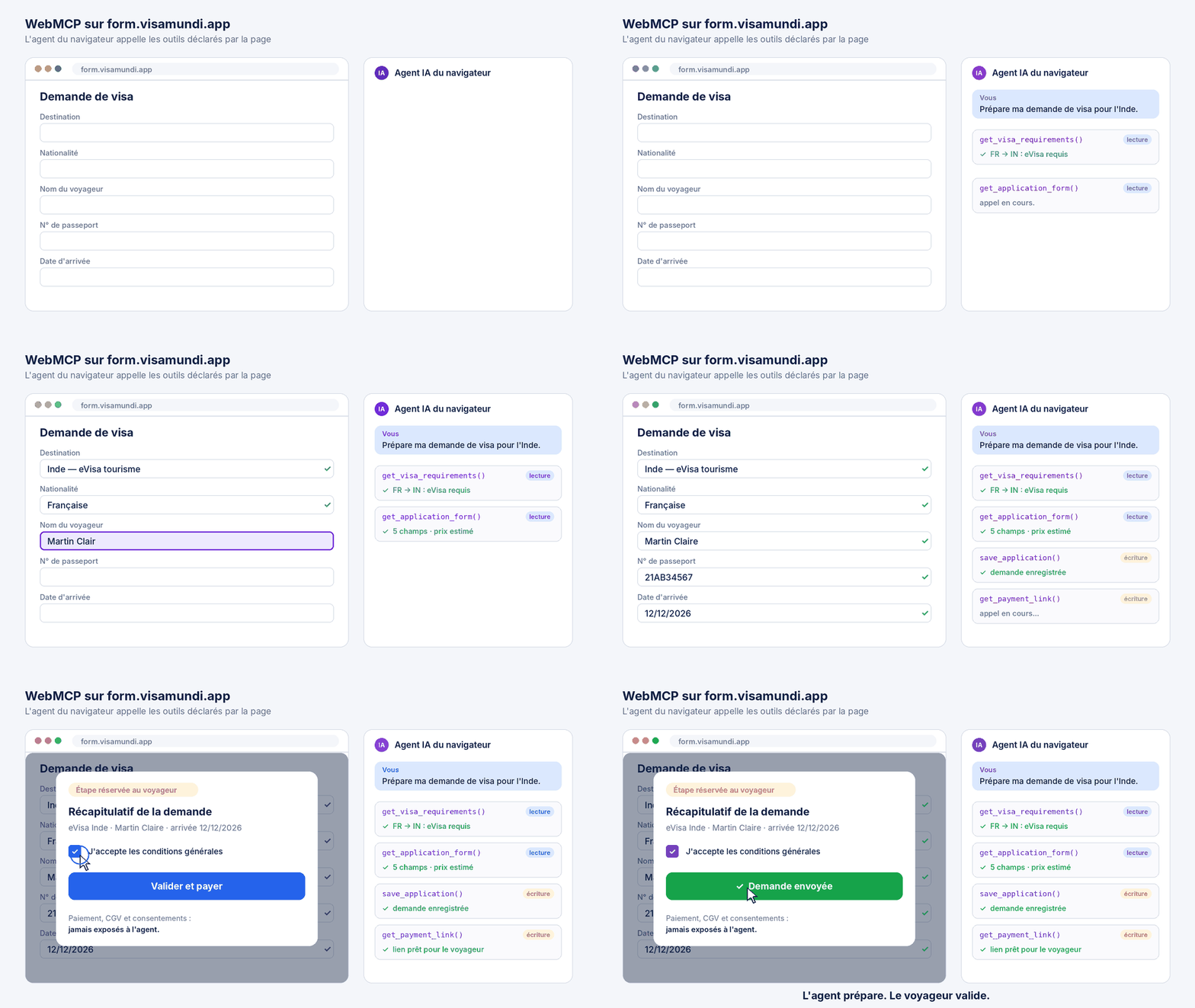
Two key details matter to our partners:
Continuity: applications prepared by the agent stay accessible for manual completion by users.
Attribution: applications prepared via a partner link retain the partner attribution, including commission fees.
The full technical documentation, including how to test WebMCP in Chrome, is available on our WebMCP documentation page.
WebMCP is still experimental, and adoption is straightforward. If you already have MCP tools defined via an API or server, exposing them via WebMCP typically only requires a few hundred lines of code. At visamundi, we're betting that AI assistants will soon become a major traffic vector, like Google today. So we chose to be ready before it becomes a standard.
Tomorrow, some of our customers won't come through Google but through their browser's AI assistant. We want visamundi to be the service they know how to use. The golden rule: AI agents prepare applications, users keep full control over validation and payments.
Sébastien Couix, founder and CEO of visamundi
Are you a travel agency, a platform, or a developer looking to integrate visa formalities into AI agents? Visit our MCP overview page or request an API key.

As CEO of Visamundi, I am dedicated to simplifying international travel by assisting our clients in obtaining visas worldwide. By staying at the forefront of ever-changing regulations, I ensure our agency remains a trusted pillar in the visa services industry.
Get our visa news first in your Google results: add Visamundi to your preferred sources.
