
For our partners, an AI assistant that answers using Visamundi data
Visamundi agencies and partners now have an AI assistant in their partner portal. It provides visa requirements, vaccines, customs rules, and progress updates for traveler groups and affiliate links—all in plain language.
Visamundi agencies and partners now have access to an AI assistant in their partner portal.
Ask questions in plain language
A client calls: they’re traveling in three weeks, with a passport you’re not familiar with, to a country you haven’t sold in a long time. Previously, answering such a question would require digging through multiple screens or contacting our team. Now, you can simply ask as it comes to mind: “Does a Moroccan traveler need a visa for India?”, “What documents are required for a tourist visa to Kenya?”
The assistant doesn’t rely on memory. For each question, it consults the same data sources used to process Visamundi client applications: entry requirements by nationality, detailed visa guides (including fees and rules), required vaccines, customs regulations. If it can’t find the information, it clearly states it rather than guessing.
A generalist AI model might confidently provide incorrect or formalities with a lot of confidence. The experience of a travel influencer couple who were denied boarding after relying on ChatGPT for visa information clearly showed how unreliable generic AI can be.
Know your travel groups, clients, and analytics in detail
The assistant also has access to your Visamundi partner account. It will only provide data from your own agency and can answer questions about:
your traveler groups: lists, visa progress per group, and groups awaiting additional information from our side ;
deadlines: current processing loads by visa type and when traveler groups visas will be ready ;
affiliate links: clients arriving through them, progress per case, clicks and sales within the specified period ;
your account: partner info, invoices, and more.
For instance, asking “Which traveler groups need information from the Visamundi team?” will pull up the relevant groups automatically. Or, “When will the visas for my Seychelles trip in April be ready?” provides an answer you can share directly with your client.
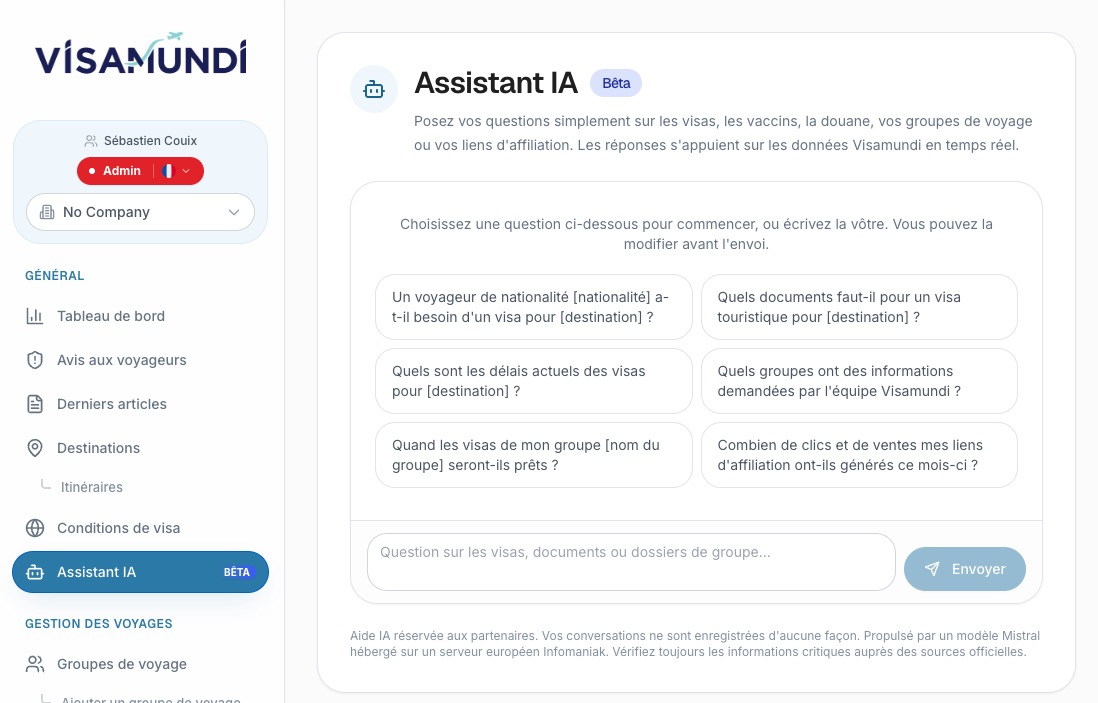
At launch, six preset questions are available as starting templates. Clicking one does not submit the question automatically—instead, it appears in the input field for your review. The placeholder data (nationality, destination, group name) is prefilled for easy editing.
The assistant bases its responses on European data servers
To ensure accuracy and security, our AI assistant runs on an open-source model developed by Mistral AI, a French tech company. The model is hosted on European servers, and responses are generated locally without recording conversations or storing them in external databases.
Queries aren’t logged in our system or kept in a historical archive. The exchange exists only on the open page and disappears when you close it. Each response is based solely on the latest official data from destination governments to provide up-to-date and reliable information.
It’s important to note that the assistant provides information, not legal advice. For complex or critical travel formalities—such as passport validity, mandatory vaccinations, or potential boarding refusals—always double-check with the official sources of the destination country. The assistant does not fill in missing details and will flag exceptions rather than fabricate answers.
Integrate Visamundi’s AI assistant with existing workflow tools
Our server MCP powers this assistant through its protocol that connects Visamundi’s data to AI assistants. If your team already uses tools like Claude, ChatGPT, Cursor, or VS Code, you can integrate directly with them from your partner portal using “MCP access”. Each integration uses a company-specific key, which can be revoked at any time, granting instant access to the full suite of Visamundi partner tools.
Note: You don’t need a key for access to reference data like visas, vaccines, and customs rules. However, partner-specific information—such as traveler groups, affiliate links, or invoices—requires the key to unlock.
How to access the AI assistant
You’ll find the assistant in your partner portal under the “AI Assistant” tab, flagged with a beta badge. Alternatively, a floating action button lets you open it directly from group and traveler case management pages—no back-and-forth needed between screens.
Want to help improve the AI assistant? Report anything missing or unreachable via the ticket section of your partner portal. Your feedback directly shapes future updates.
As CEO of Visamundi, I am dedicated to simplifying international travel by assisting our clients in obtaining visas worldwide. By staying at the forefront of ever-changing regulations, I ensure our agency remains a trusted pillar in the visa services industry.
Get our visa news first in your Google results: add Visamundi to your preferred sources.
